
Tips on Invoicing Avoidable Damage
Accurate repair descriptions are important when invoicing for avoidable damage. To help prevent returned invoices, clearly explain whether the repair was caused by normal use or avoidable damage. Many invoices are returned because the repair details are too vague.
Simply labeling a repair as “normal use” or “avoidable damage” is not enough. You must also describe the damage and explain how it happened or could have been prevented.
Avoidable damage includes repairs caused by misuse, improper operation, or abuse. Signs of avoidable damage may include broken, dented, bent, cut, or torn parts, or debris from the outside found in the equipment.
- Acceptable – broken mirror due to impact
- Unacceptable – replaced mirror
XPO Logistics Policy and Procedures Document Update
The Toyota Fleet Department has revised the standing Dealer P&P Manual for XPO Logistics, effective July 1, 2025. The updated Dealer Policy and Procedure Manual is available on the Dealer Portal under Solution Center > Fleet > XPO Logistics. The primary changes are increases in rental rates, PM rates, and service labor rates, along with additional information about the new PO structure.
Any questions or concerns can be addressed to the XPO Team at XPOTeam@ToyotaTMH.com.
Equipment Load Request Macro v1.5 Release
We have rolled out version 1.5 of the load request form. Update notes include:
- Combination of Toyota and Raymond load methods. You now only need to provide either the Toyota Frame-Serial or VIN, or the Raymond serial.
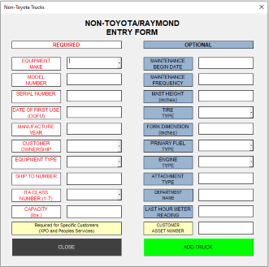
- Other Makes Form now includes more equipment types and makes
- This also clarifies available ITA classes.
- Capacities are now fully indicated as needing to be in lbs.
- Specifics are notated as to which customers require CEN
- Updates to the Graphics User Interface
- Larger text as well as graphics user interface changes to streamline
- Updated Toyota Model-Frame Chart
v2.0 will include all these updates, as well as integration of support documents that combine our SOP, FAQ, and useful tools such as graphics for determining ITA class of units, Error Management Notes, and best practices when creating support tickets for ELR issues.
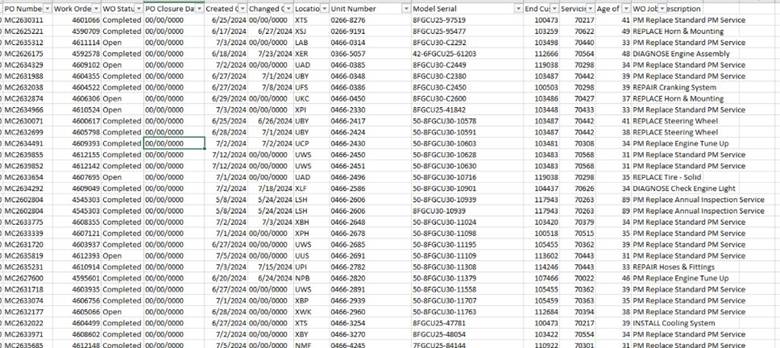
XPO Logistics: Open and Completed Work Order Report
We have launched an automated communication that includes an Excel spreadsheet listing all work orders marked ‘open’ or ‘completed’ in our system. We don’t have an associated invoice. Please continue to communicate with the Fleet Department regarding any issues obtaining POs for customers. We are addressing the issue with XPO and developing an action plan.
Example of the Report:
If you have not received this or are receiving it and no longer wish to. Please email the XPO Team at XPOTeam@toyotatmh.com to update the distribution list.
Tentative Town Hall
The Fleet Town Hall schedule has been announced. Topics will include Account Updates, PM Management, Fleet Metrics, MyInsights®, the MyToyota Portal, eCommerce, and other important items. These meetings are a great opportunity to learn, stay informed, and ask questions. Dates are subject to change.
- August 18
- October 20
- December 8
T360 Trainings
The proposed schedule for 2026 T360 Training sessions is listed below. Please save the dates and look for more details in the coming months. Dates are tentative and may change.
- July 10
- September 4
- November 6
- December 4
Key Updates Included in the Cheat Cards
- To set return ETAs on the Service Channel Provider Mobile App, on the login screen, your technicians will now leave the toggle on “USER ID” and log on with the username and password that we provide you with:
- Username: Service.channel2@toyotatmh.com
- Password: Toyota1
- No longer move the toggle to “PIN CODE” when logging on to the Service Channel Provider Mobile App
- You may still use the store phone to check in and out of the IVR system, but you will not be able to set return ETA’s. Your Toyota PIN will remain the same:
- Toyota PIN: 4381686
- If you are not IVR compliant, your invoice will be paid shortly to what is shown on the Service Channel IVR System
- The IVR System must be within 14 minutes of what is being requested on your Home Depot invoice
- Dealers do not have access to the desktop version of the Service Channel to update and view work orders
- All work orders can be viewed on the Service Channel Provider Mobile App, but ETAs cannot be updated
If you have any questions, please reach out to Jessica Hall at Jessica.Hall@toyotatmh.com.
XPO Parts Pricing Update: Dealer Rebate
Be on the lookout for updated parts pricing/rebate plan for dealers regarding XPO Logistics. XPO will take 3% off Fleet Rates for National Published Parts pricing, in addition to their standing 18% discount. The difference will be paid back to the dealers as a standard rebate. A TMH/dealer town hall to address questions and concerns will be announced shortly.
Fleet Support
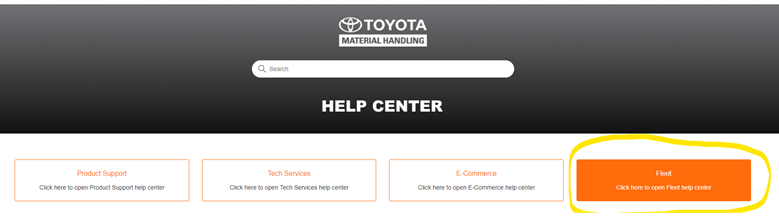
Fleet Support is available through the Dealer Portal. For any fleet inquiries, please create a ticket through the Dealer Portal.
- “Log on to the Toyota Dealer Portal – click on Fleet Metrics – Click on Fleet Support – Click on Launch Fleet Support”
- Fill out Fleet Support Tickets for shorter response time
- When you access fleet support to initiate a ticket, please ensure you are selecting “Fleet”
Softbase Invoice Segmentation Issue
Dealers may notice that Softbase is creating additional, unintended invoice segments. This is a known issue, and a fix has already been developed. The internal SAP team is currently testing the fix. Another update will be shared once testing is complete and the deployment schedule is confirmed.
USPS Account Updates
Toyota has signed a multi-year equipment sales agreement with the USPS. TMH will deliver about 1,900 units in 2026. The USPS Project Management Team is working with sites nationwide to replace long-term rentals and older fleet units with newly owned equipment.
When picking up or dropping off USPS rentals, always get the printed name and signature of the USPS associate. Keep a copy of your records and provide a copy to the USPS associate as well.
To help USPS track returned rentals, the rental deactivation period has been reduced to 45 days. If no invoice is received within 45 days after the last billed rental end date, the unit will be deactivated and assumed to be offsite. If a unit remains on-site after being deactivated due to a lapse in invoicing, submit a load request or a fleet support ticket to reactivate it.
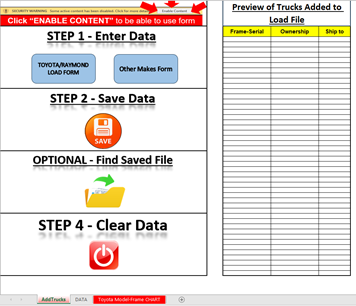
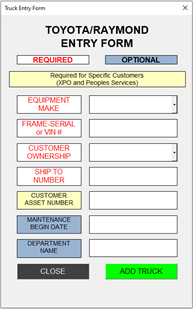
Equipment Load Request Macro v1.75 Release
Version 1.75 of the Load Request Form has been released with several updates and improvements, including:
- Toyota and Raymond’s load methods have been combined. You now only need to enter either the Toyota Frame-Serial/VIN or the Raymond serial number
- The Other Makes form now includes additional equipment types and makes
- ITA classes are now more clearly defined
- Capacity requirements are clearly listed in pounds (lbs.)
- Customers requiring CEN are now identified
- User interface improvements:
- Larger text and updated graphics for easier navigation
- Updated Toyota Model-Frame Chart
- New Equipment Load Guide tab includes:
- Corporate customer numbers
- Customer names
- Location unit formatting
- Examples of location units
- Customers who allow rentals
For Equipment Load Request Help, click here.
For the Fleet Support Help Center, click here.
Fleet Power BI Reporting
Introducing the Fleet Dealer Power BI App
The Fleet Dealer Power BI App is a reporting solution built exclusively for Toyota dealers. Designed to transform complex operational data into clear, actionable insights, it helps you identify growth opportunities, improve customer retention, increase service performance, and stay ahead of the KPIs that drive dealership success.
See Opportunities Before They Become Problems
Identify fleet growth opportunities, monitor service market share, and uncover equipment nearing lease expiration. Gain visibility into newly added locations, recently loaded equipment, and aging fleets so you can proactively expand your business.
Improve Cash Flow and Billing Performance
Stop chasing invoice issues after they occur. Monitor returned invoices, denied invoices, submission delays, payment trends, and invoice variances to reduce billing errors, accelerate payments, and improve operational efficiency.
Turn Service Data into Revenue Insights
Understand exactly where your service revenue is coming from and where opportunities exist. Analyze repair, PM, rental, parts, and avoidable damage revenue while identifying customer spending trends, cost-per-unit metrics, and equipment replacement opportunities.
Stay Ahead of Periodic Maintenance Schedules
Never lose sight of upcoming, overdue, or missed PMs. Proactively schedule service, improve compliance, strengthen customer relationships, and increase recurring service revenue.
Track the Metrics That Matter Most
Monitor critical Service Channel KPIs, including on-time arrival, resolution time, first-day fix rates, invoice submission compliance, IVR compliance, and after-hours service performance—all from a single dashboard.
Maximize T360+ Performance
Identify units missing PM activity, uncover scheduling opportunities, monitor program participation, and ensure customers receive the full value of their T360+ investment.
Measure Performance Across Your Entire Dealership
The Dealer Scorecard brings your most important operational metrics together in one place. Compare performance across dealer branches, monitor President’s Points-related metrics, track PM completion, improve billing compliance, and identify areas requiring attention before they impact results.
One Platform. One Version of the Truth.
Instead of managing your business through spreadsheets, disconnected reports, and manual analysis, the Fleet Dealer App provides a single source of truth for your fleet operation, helping your team make faster decisions, improve customer satisfaction, increase profitability, and drive continuous improvement.
How to Access Fleet Power BI Dashboards
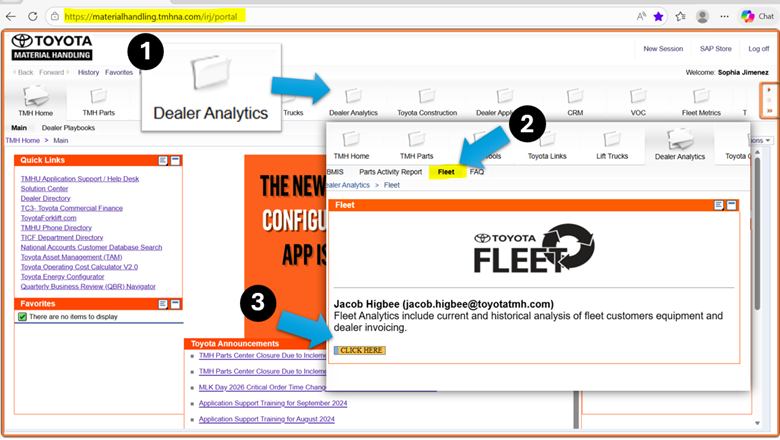
Fleet dashboards can be accessed via the Dealer Portal.
Once on the website:
1. Navigate to the Dealer Analytics folder.
2. Select the Fleet tab
3. Click on the yellow “Click Here” button to access the TMH Fleet Dealer dashboard.
Roles That Have Access to Fleet Dashboards
The Staff Master Roles below receive permission to access the Fleet Power BI dashboards:
- Dealer Principal
- VP Sales/Ops
- UIO Admin.
- General Manager
- Branch Manager
- Parts Manager
- Warranty Manager
- CSS Manager
- Rental Manager
- Ops Manager
- Asst. Ser. Manager
- Service Dispatch