
Mary Hargitt Retirement
After more than 12 years of dedicated service, Mary Hargitt will be retiring from the Fleet Department. Mary joined the team in June 2012 and has been a valued member of Fleet ever since.
Throughout her time with us, Mary has consistently demonstrated professionalism, commitment, and a strong dedication to supporting our dealer network. Her experience and steady presence have made a lasting impact on both our team and our partners.
As she begins this exciting new chapter, Mary plans to spend her time relaxing and traveling. Something she has certainly earned!
Please join us in thanking Mary for her years of service and wishing her all the best in a happy, healthy, and adventure-filled retirement.
Congratulations, Mary, you will be missed!
Tips on Invoicing Avoidable Damage
The information you provide in the repair descriptions of your invoice is crucial to identifying the nature of the repairs, normal use, or avoidable damage. To decrease or prevent returned invoices, be sure to identify in the repair description if the repair is due to avoidable damage or normal use. Many returned invoices would have been avoidable if the specifics of the repairs had been mentioned.
Please note that only identifying normal use or avoidable damage, with an incomplete repair description, is not enough to prevent a return. In addition, you must also state if it was avoidable damage, and how it could have been prevented by using descriptive wording. Avoidable damage is identified as repairs due to misuse, unintended use, or operator abuse, as evidenced by broken, dented, bent, cut, or ripped components, or by outside debris embedded in the equipment.
Examples of what is and is not acceptable:
- Acceptable – broken mirror due to impact
- Unacceptable – replaced mirror
Invoicing Portal Updates
A recall button was added to the bottom of the Invoicing Portal, allowing dealers to move invoices from Submitted or Review status back to Not Submitted. This reduces the need for Fleet Support tickets by enabling dealers to make their own edits without waiting for invoice processors, improving efficiency and streamlining the invoice process.
USPS Dealer Policy and Procedure Updates
The Toyota Fleet department has agreed to a contract extension with the United States Postal Service. The updated Dealer Policy and Procedure Manual can be found on the dealer portal under Solution Center> Fleet> USPS. The primary changes to the P&P include increases in parts pricing and labor rates, clarification of billable travel time, and a requirement that each parts order include a unique work order number.
USPS Seasonal Rentals
The USPS Seasonal rental period is currently ongoing and ended on February 28. All rental invoices for seasonal rentals must be submitted to the fleet department by February 28. All seasonal rentals will be deactivated on March 2. If any USPS site keeps a rental past March 2, please submit a fleet support ticket so we can reactivate it as a general rental rather than a seasonal one.
For any customer with a rental onsite for more than 90 days, it is the servicing dealer’s responsibility to perform PMs on those units. Regular PMs on rental units are essential to ensure the unit remains at the facility, the rental is in safe working condition, and to capture service opportunities for rental damage as they occur. Please ensure that regular PMs are being performed on rental units at any customer on a regular basis.
XPO Logistics Policy and Procedures Document Update
The Toyota Fleet Department has revised the standing Dealer P&P Manual for XPO Logistics, effective July 1, 2025. The updated Dealer Policy and Procedure Manual can be found on the dealer portal under Solution Center> Fleet> XPO Logistics. The primary changes are increases in Rental rates, PM rates, and service labor rates, as well as added information about the new PO structure.
Any questions or concerns can be addressed to XPOTeam@ToyotaTMH.com.
TICF Grounding Platform for National Accounts
Dealers can use the National Account Help Box to inform TICF of ANY off-lease National Account units returned to their dealership. Please click this link to view the TICF notification about this improved feature.
Policy and Procedures (P&P) Reminders and Updates
Fleet policy and procedure manuals are currently being reviewed and updated for the new year, as needed. Over the next few months, please visit the Toyota Portal Solution Center Fleet folder to download the most current versions of each manual. As a best practice, we encourage you to routinely check the Solution Center for the latest Fleet customer updates and information.
Equipment Load Request Macro v1.5 Release
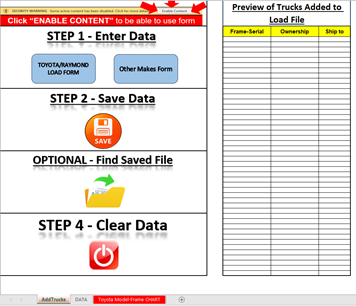
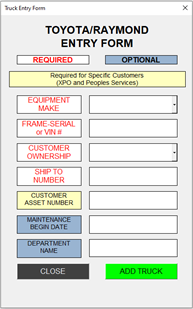
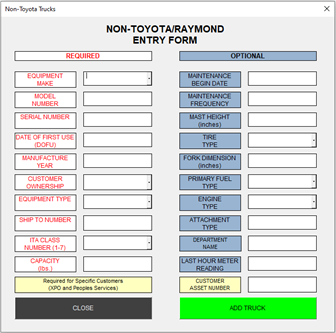
We have rolled out version 1.5 of the load request form. Update notes include:
- Combination of Toyota and Raymond load methods. You now only need to provide either the Toyota Frame-Serial or VIN, or the Raymond serial.
- Other Makes Form now includes more equipment types and makes.
- This also clarifies available ITA classes.
- Capacities are now fully indicated as needing to be in lbs.
- Specifics are notated as to which customers require CEN
- Updates to the Graphics User Interface
- Larger text as well as graphics user interface changes to streamline
- Updated Toyota Model-Frame Chart
v2.0 will include all of these updates as well as integration of support documents that combine our SOP, FAQ, and useful tools such as graphics for determining ITA class of units, Error Management Notes, and best practices when creating support tickets for ELR issues.
XPO Logistics: Open and Completed Work Order Report
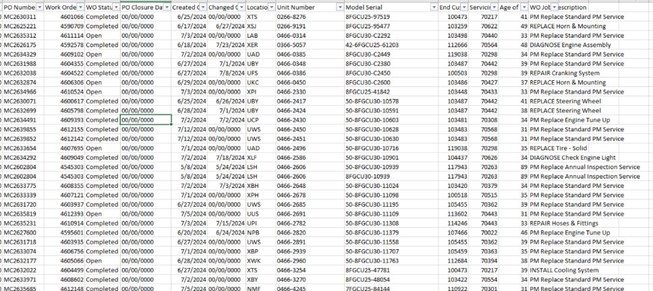
We have launched an automated communication that includes an Excel spreadsheet listing all work orders marked ‘open’ or ‘completed’ in our system. We don’t have an associated invoice.
Please continue to communicate with the Fleet Department regarding any issues obtaining POs for customers. We are addressing the issue with XPO and developing an action plan.
Example of the Report:
If you have not received this or no longer wish to. Please email the XPO Team at XPOTeam@toyotatmh.com to have the distribution list updated.
New Customer Launch: Central Transport
Central Transport launched as a Fleet customer on May 1, 2025.
- Reference the Portal for the Policy and Procedure Manual and Dealer Match for participating Central Transport locations.
- Dealer Match File posted in portal: Solution Center>Fleet>Central Transport
- *Send PM checklist and WO details to the contact listed and the Central Transport Manager/ Supervisor when service is completed.

- Column L on the Dealer Match File lists what locations are serviced by the Toyota Dealer and which locations are self-maintained.
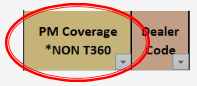
- This customer is on Fleet PM Management
- TMH will send the POs for PMs due each month
- Exception–T360’s do not require a PO
- No NTE, but PO is required for all services
- Customer will provide a PO at the time of service request
- Do not respond to a service request without a PO
- No PO=no payment
- Service Requests: Breakdown service requests are being communicated via MyToyota via the “Request Service” button
- Requests are sent to the Dealer’s Service email listed in Staff Master.
- Best Practice is to respond to the customer to confirm receipt of the service request and ETA
Tentative Town Hall
The schedule for Fleet Townhalls has been released. As always, we will cover a range of topics, including Account Specifics, PM Management, Fleet Metrics, MyInsights, MyToyota Customer Portal, E-Commerce, and other miscellaneous items. These meetings present a fantastic opportunity to learn and engage by asking questions. Dates are subject to change.
- April 21
- June 16
- August 18
- October 20
- December 8
T360 Trainings
The schedule for T360 Trainings are tentatively scheduled for 2026. More details will be sent out in the coming months. Dates are subject to change.
- May 8
- July 10
- September 4
- November 6
- December 4
eCommerce Training Dates
The next scheduled eCommerce training is tentative for May 12 but is subject to change.
Fleet Analytics for Dealer Insights
A report dictionary outlining key users and info in each report to simplify navigation is in progress. We are also working on creating concise training videos for basic PowerBI skills and the effective use of every report that is in the app.
Please direct all questions regarding PowerBI to Yannick Fernando at Yannick.Fernando@toyotatmh.com and include your email and parent dealer code.
IVR Elapsed Time Tool
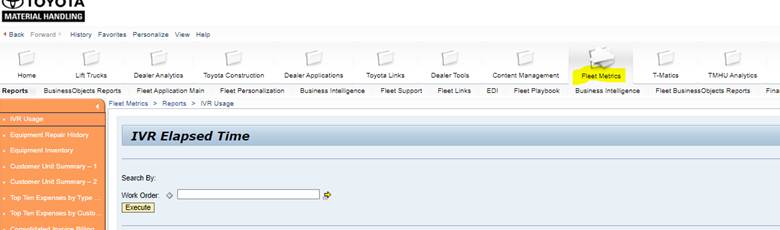
Fleet Metrics > Reports > IVR Usage
When using the IVR Elapsed Tool on the Dealer Portal, please use the 9-digit Service Channel PO number for the work order number.
Planned Maintenance Management
- PM due dates are based off original maintenance start date
- Every PM due has a “notification” created in our system
- Due dates are created based on the prior service date
- PM notifications cannot be closed without performing and billing the PM invoice
- FM PMs need the notification closed by logging the PM information on the Toyota Dealer Portal
- T & M PMs require invoice submission via the Toyota Dealer Portal
- TMH does notify the dealer when PMs are due (first of month upcoming PMs, 7th of month issued PM report, 15th of month PM scorecard)
- Home Depot PM POs requested and sent on the first of the month
- Home Depot PMs need to be completed the month they are due
- Timeframe – Complete and submit invoices within 7 days of PM service
- Top Root Causes for Poor PM Completion Performance
- Dealer uses the business system instead of the reports sent by TMH
- Dealer fails to close FM PMs – This is completed on the Dealer Portal
- Dealer gets out of alignment – Follow the reports we send first, second, and third week each month
- Customer rejects PM – Enter Fleet Support Ticket
- Unserviceable units – Enter Fleet Support Ticket
Home Depot U.S. Service Channel IVR Cheat Cards
Our team has developed Service Channel IVR Cheat Cards that technicians and dealership associates can reference when working on Home Depot work orders. Please find the attached Service Channel IVR Cheat Cards here. The cheat cards can also be found on the solution center in the Toyota Dealer Portal: Solution Center > Fleet > Home Depot > United States
Key Updates Included in the Cheat Cards
- To set return ETAs on the Service Channel Provider Mobile App, on the login screen, your technicians will now leave the toggle on “USER ID” and log on with the username and password that we provide you with:
- Username: Service.channel2@toyotatmh.com
- Password: Toyota1
- No longer move the toggle to “PIN CODE” when logging on to the Service Channel Provider Mobile App
- You may still use the store phone to check in and out of the IVR system, but you will not be able to set return ETA’s. Your Toyota PIN number will remain the same:
- Toyota PIN: 4381686
- If you are not IVR compliant, your invoice will be short-paid to what is shown on the Service Channel IVR system
- The IVR system must be within 14 minutes of what is being requested on your Home Depot invoice
- Dealers do not have access to the desktop version of the Service Channel to update and view work orders
- All work orders can be viewed on the Service Channel Provider Mobile App, but ETA’s cannot be updated
If you have any questions, please reach out to Jessica Hall at jessica.hall@toyotatmh.com.
ABC Supply
ABC Supply recently signed a contract to come onto the TMH fleet program. We have not established a cut-off date for invoices to be sent over to TMH. Do not contact or inform your ABC Sites. Please be on the lookout for a dealer alert that will provide that date, as well as other ABC-specific information.
TICF National Account Lease Return Process Update
General
- Submit your invoices with the correct quantity of labor instead of flat rate labor
- Submit all quotes over the NTE through Fleet Support
- Do not perform repairs without quote approval on repairs over the NTE (for customers requiring DNE)
- Make sure your equipment is loaded in our system before you submit your invoices
- Ensure your titles and emails are updated in Staff Master
Equipment Load Requests
Verify equipment is already loaded using the equipment search tile. Only use the required fields in the load request form (use the macro template to help you find that it is located on the portal equipment tile). Frame-serial required in the frame-serial field for Toyotas. Then use a valid Toyota end customer number (use the location table to help you find the TMHU end customer #).
Equipment Load Request Help – https://tmhu.zendesk.com/hc/en-us/articles/17670928234011-Equipment-Load-Request-Instructions
Fleet Support Help Center – https://support.toyotaforklift.com/hc/en-us
XPO Parts Pricing Update: Dealer Rebate
Be on the lookout for updated parts pricing/rebate plan for dealers regarding XPO Logistics. XPO will take 3% off Fleet Rates for National Published Parts pricing, in addition to their standing 18% discount. The difference will be paid back to the dealers as a standard rebate. A TMH/dealer town hall to address questions and concerns will be announced and held in the next week.
Fleet Support
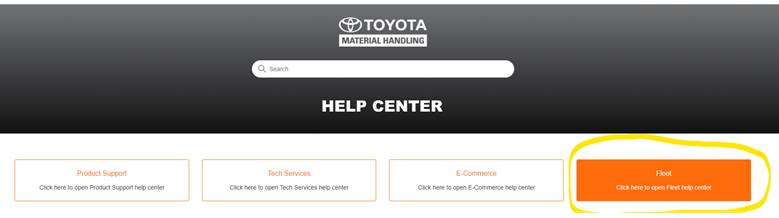
Fleet Support is available through the Dealer Portal. For any fleet inquiries, please create a ticket through the Dealer Portal.
- “Log on to Toyota Portal – click on Fleet Metrics – Click on Fleet Support – Click on Launch Fleet Support.”
- Ensure you are filling out Fleet Support Tickets completely to ensure a shorter response time.
- When you access fleet support to initiate a ticket, please ensure you are selecting “Fleet.”
TMH Fleet Dealer App Development Complete
The TMHNA Fleet Team has completed development of the TMH Fleet Dealer App in Power BI and User Management/Security. Staff Master Roles will be used to maintain users in the environment, which will update every Monday. The TMH Fleet Dealer App launched on Tuesday, September 16, 2025, and included the new Fleet Dealer Scorecard.
The following roles in Staff Master will automatically have access to the Fleet Dealer App in PowerBI but will not receive all Fleet reporting.

Please note that individuals may hold more than one role in Staff Master
All Fleet reporting will transition starting Wednesday, October 1to a similar structure and be based off roles in Staff Master.
Below is the list of roles that will create the Fleet Reporting distribution list.
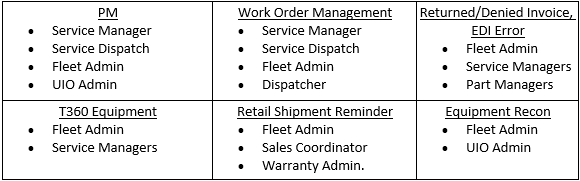
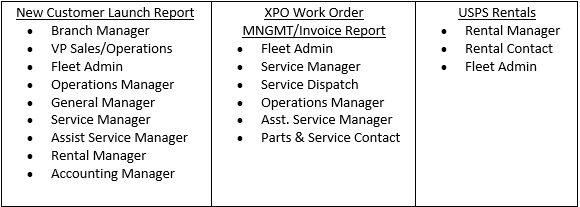
Please take this time to review the above list of reports and update Staff Master Roles as needed. Please have your Staff Master list updated before Wednesday, October 1 to support a successful launch.
For questions or concerns, please create a Fleet Support ticket or email Zach Whitsitt at Zach.Whitsitt@toyotatmh.com.