
USPS Account Updates
Toyota has secured a multi-year equipment sales contract with USPS. TMH will deliver approximately 1,900 units in 2026. The USPS Project Management Team is working closely with the sites that will be receiving these new units. They are currently targeting long-term rentals to replace owned units across the country, as well as aging units in their fleet. When picking up or dropping off a rental for USPS, always get a printed name and signature from USPS associates and retain a copy for your records. Please provide a copy to USPS associates as well.
As part of an effort to help USPS identify rentals that have been returned, we have reduced the deactivation period for rentals at USPS to 45 days. If we do not receive an invoice 45 days after the last invoiced rental end date, the unit will be deactivated and assumed offsite. If there is a lapse in invoicing and a rental is deactivated after 45 days that is still onsite, please submit a load request or fleet support ticket to have the rental reactivated.
Invoicing Avoidable Damage Details
We are receiving many invoices that have to be returned because of the lack of specificity on whether the repairs are due to avoidable damage. The information you provide in the repair descriptions of your invoice is crucial to identifying the nature of the repairs, normal use, or avoidable damage. To decrease or prevent returned invoices and or back-and-forth communication, be sure to identify in the repair description if the repair is due to avoidable damage or normal use.
Only identifying normal use or avoidable damage, with an incomplete repair description, is not enough to prevent a return. In addition, you must also state if it was avoidable damage, and how it could have been prevented by using descriptive wording. Avoidable damage is identified as repairs due to misuse, unintended use, or operator abuse as evidenced by broken, dented, bent, cut, or ripped components, or outside debris that has become embedded within the equipment.
Examples of what is and is not acceptable:
- Acceptable – broken mirror due to impact
- Unacceptable – replaced mirror
Softbase Invoice Segmentation Issue
Dealers may be experiencing an issue in which Softbase is creating additional unintended segments on invoices. This has been identified as a known issue, and a fix has been developed. The solution is currently undergoing validation by our internal SAP team. A follow-up update will be provided once validation is complete and deployment timing is confirmed.
Fleet Power BI Reporting
Introducing the Fleet Dealer Power BI App
What if you could see the health of your entire fleet business in one place?
The Fleet Dealer Power BI App is a reporting solution built exclusively for Toyota Dealers. Designed to transform complex operational data into clear, actionable insights, it helps you identify growth opportunities, improve customer retention, increase service performance, and stay ahead of the KPIs that drive dealership success.
See Opportunities Before They Become Problems
Identify fleet growth opportunities, monitor service market share, and uncover equipment nearing lease expiration. Gain visibility into newly added locations, recently loaded equipment, and aging fleets so you can proactively expand your business.
Improve Cash Flow and Billing Performance
Stop chasing invoice issues after they occur. Monitor returned invoices, denied invoices, submission delays, payment trends, and invoice variances to reduce billing errors, accelerate payments, and improve operational efficiency.
Turn Service Data into Revenue Insights
Understand exactly where your service revenue is coming from and where opportunities exist. Analyze repair, PM, rental, parts, and avoidable damage revenue while identifying customer spending trends, cost-per-unit metrics, and equipment replacement opportunities.
Stay Ahead of Periodic Maintenance Schedules
Never lose sight of upcoming, overdue, or missed PMs. Proactively schedule service, improve compliance, strengthen customer relationships, and increase recurring service revenue.
Track the Metrics That Matter Most
Monitor critical Service Channel KPIs, including on-time arrival, resolution time, first-day fix rates, invoice submission compliance, IVR compliance, and after-hours service performance—all from a single dashboard.
Maximize T360+ Performance
Identify units missing PM activity, uncover scheduling opportunities, monitor program participation, and ensure customers receive the full value of their T360+ investment.
Measure Performance Across Your Entire Dealership
The Dealer Scorecard brings your most important operational metrics together in one place. Compare performance across dealer branches, monitor President’s Points-related metrics, track PM completion, improve billing compliance, and identify areas requiring attention before they impact results.
One Platform. One Version of the Truth.
Instead of managing your business through spreadsheets, disconnected reports, and manual analysis, the Fleet Dealer App provides a single source of truth for your fleet operation—helping your team make faster decisions, improve customer satisfaction, increase profitability, and drive continuous improvement.
How to Access Fleet Power BI Dashboards
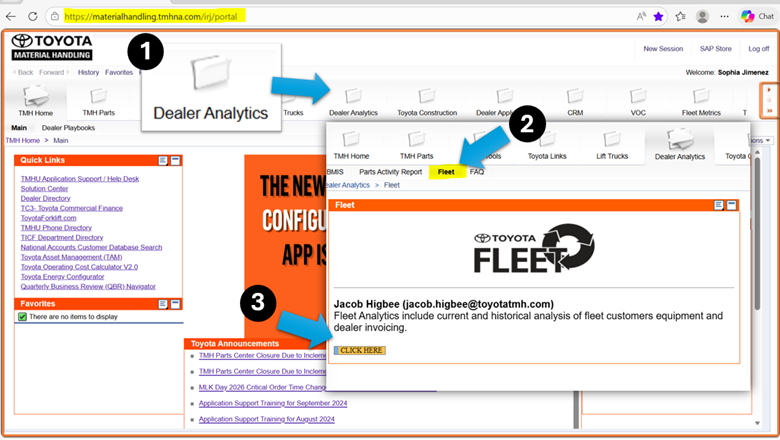
Fleet dashboards can be accessed by going to the Dealer Portal: https://materialhandling.tmhna.com/irj/portal
Once on the website:
1. Navigate to the Dealer Analytics folder.
2. Select the Fleet tab
3. Click on the yellow “Click Here” button to access the TMH Fleet Dealer dashboard.
Roles That Have Access to Fleet Dashboards
The Staff Master Roles below receive permission to access the Fleet Power BI dashboards:
- Dealer Principal
- VP Sales/Operations
- UIO Admin.
- General Manager
- Branch Manager
- Parts Manager
- Warranty Manager
- CSS Manager
- Operations Manager
- Assistant Service Manager
- Service Dispatch
- Fleet Admin
- Sales Coordinator
- Customer Care
- CSS Rep
- Dispatcher
Tentative Town Hall Dates
The schedule for Fleet Townhalls has been proposed, so please mark your calendar. As always, we will cover a range of topics, including Account Specifics, PM Management, Fleet Metrics, MyInsights®, MyToyota Customer Portal, eCommerce, and other miscellaneous items. These meetings present a fantastic opportunity to learn and engage by asking questions. These are subject to change, so please pay attention to updates.
- October 20
- December 8
T360 Tentative Training
The schedule for T360 Trainings has been proposed for calendar year 2026. Below is the tentative schedule for these training sessions, so please mark your calendar. More details will be sent out in the coming months. These are subject to change, so please pay attention to updates.
- September 4
- November 6
- December 4
Equipment Load Request Macro v1.75 Release
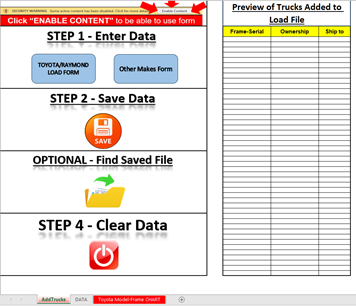
We have rolled out version 1.75 of the load request form. Update notes include:
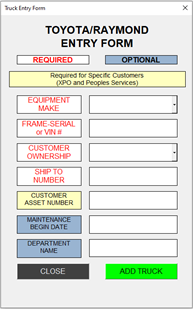
- Combination of Toyota and Raymond load methods. You now only need to provide either the Toyota Frame-Serial or VIN, or the Raymond serial.
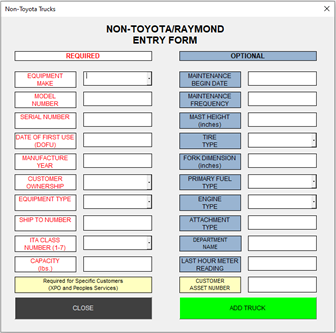
- Other Makes Form now includes more equipment types and makes.
- This also clarifies available ITA classes.
- Capacities are now fully indicated as needing to be in lbs.
- Specifics are notated as to which customers require CEN
- Updates to the Graphics User Interface
- Larger text as well as graphics user interface changes to streamline
- Updated Toyota Model-Frame Chart
- Equipment Load Guide Tab
- Corporate Customer Numbers
- Customer Names
- The Location Unit Format
- Examples of location unit
- Customers who allow for rentals
Helpful Links
Equipment Load Request Help – https://tmhu.zendesk.com/hc/en-us/articles/17670928234011-Equipment-Load-Request-Instructions
Fleet Support Help Center – https://support.toyotaforklift.com/hc/en-us