
When grounding an off-lease unit in the Remarketing Return Site, dealers are required to submit a signed/dated Bill of Lading for each grounded unit. This requirement has been in effect since November 7, 2025.
INSTRUCTIONS: HOW TO ADD THE BILL OF LADING
- Locate the Account tab in the Return Site, look for the “Bill of Lading Date” field.
- Click the Edit button in the upper right corner of the Account tab and key in the true off-lease Return Date of the unit in the Bill of Lading Date field.
- Once you’ve entered the Return Date, you will then click on the +Add Scan button. Drag and Drop or Browse to add your signed/dated Bill of Lading to the Return Site.
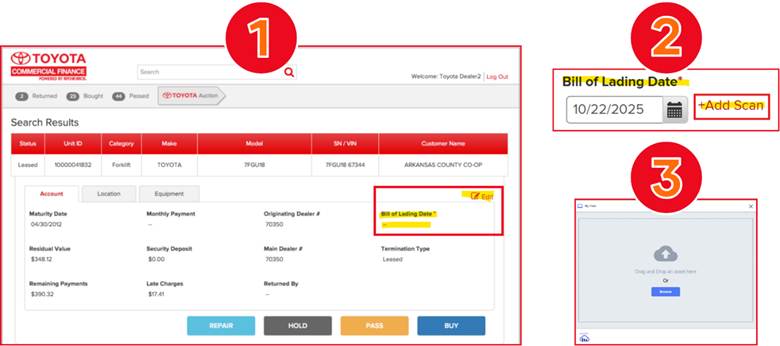
It’s that easy! Please follow this process to add the signed/dated Bill of Lading to the Return Site.
If you have any questions about the process, please contact your Remarketing Analyst at TICF_Remarketing_SM@Toyotacf.com.